A step-by-step guide to securing your entire smart home network. Protect all your connected devices from cyber threats.

A step-by-step guide to securing your entire smart home network. Protect all your connected devices from cyber threats.
How to Secure Your Smart Home Network from Cyber Threats
Hey there! So, you’ve decked out your home with all sorts of cool smart gadgets, right? Smart lights, smart thermostats, smart speakers, maybe even a smart fridge. It’s awesome how these devices make life easier and more convenient. But here’s the thing: every smart device you add to your network is another potential doorway for cyber threats. Think of your smart home as a digital fortress. You wouldn’t leave the drawbridge down, would you? Exactly! Securing your smart home network isn’t just a good idea; it’s absolutely essential in today’s connected world. This guide is going to walk you through everything you need to know, from the basics of network security to advanced tips and product recommendations, ensuring your digital sanctuary remains safe and sound.
Understanding Your Smart Home Network The Digital Ecosystem
Before we dive into securing things, let’s get a clear picture of what a smart home network actually is. At its core, it’s a collection of interconnected devices that communicate with each other and often with the internet. Your Wi-Fi router is the central hub, acting as the gateway to the outside world. Every smart device, from your doorbell to your vacuum cleaner, connects to this network. This interconnectedness is what makes smart homes so powerful, but it also creates a complex web of potential vulnerabilities. Understanding this ecosystem is the first step towards effectively protecting it. We’re talking about everything from your smartphone controlling your lights to your security cameras streaming video – all of it relies on a secure network foundation.
The Risks and Threats to Your Smart Home Cybersecurity
It’s not all sunshine and smart assistants. There are real, tangible risks when it comes to smart home security. Cybercriminals are always looking for weak points, and an unsecured smart home can be a goldmine for them. What kind of threats are we talking about? Well, for starters, there’s unauthorized access. Imagine someone gaining control of your smart locks or security cameras. That’s a pretty scary thought, right? Then there’s data theft. Many smart devices collect personal data – your habits, your schedule, even your conversations. If this data falls into the wrong hands, it could lead to identity theft or privacy breaches. And let’s not forget about malware and ransomware. Your smart devices can be infected, turning them into bots for larger attacks or holding your data hostage. Even seemingly innocuous devices can be exploited. For example, a smart light bulb with a vulnerability could be used as an entry point to your entire network. It’s crucial to be aware of these dangers so you can take proactive steps to protect yourself.
Essential First Steps Securing Your Router and Wi-Fi
Your Wi-Fi router is the heart of your smart home network, so securing it is paramount. Think of it as the main gate to your digital fortress. If that gate is weak, the whole fortress is vulnerable. Here’s how to lock it down:
Change Default Router Credentials Strong Passwords for Network Security
This is probably the most important step. Most routers come with default usernames and passwords (like ‘admin’ and ‘password’). These are widely known and easily exploited. The very first thing you should do is change both the username and password to something strong and unique. Use a combination of uppercase and lowercase letters, numbers, and symbols. Don’t use personal information like your birthday or pet’s name. A strong password acts as your first line of defense against unauthorized access.
Enable WPA3 or WPA2 Encryption Wi-Fi Security Protocols
Wi-Fi encryption scrambles your data so that only authorized devices can read it. WPA3 is the latest and most secure standard, offering robust protection. If your router supports it, enable WPA3. If not, make sure you’re using WPA2-AES. Avoid older, weaker protocols like WEP or WPA/WPA2-TKIP, as they are much easier to crack. You can usually find these settings in your router’s administration panel.
Create a Guest Network Isolating Smart Devices for Enhanced Security
Many modern routers allow you to set up a separate guest network. This is a fantastic security measure for your smart home. Connect all your smart devices (especially those from less reputable manufacturers or those that don’t receive frequent updates) to this guest network. This isolates them from your main network where you keep your computers, smartphones, and other sensitive data. If a smart device on the guest network gets compromised, the attacker won’t have direct access to your primary devices. It’s like having a separate, less secure waiting room for certain guests, keeping them away from your valuables.
Keep Router Firmware Updated Patching Vulnerabilities
Router manufacturers regularly release firmware updates that include security patches and bug fixes. These updates are crucial for protecting your network from newly discovered vulnerabilities. Check your router’s administration panel or the manufacturer’s website regularly for available updates. Some routers even offer automatic updates, which is a convenient feature to enable if available.
Disable WPS Wi-Fi Protected Setup Risks
Wi-Fi Protected Setup (WPS) is a feature designed to make connecting devices easier, often with a simple button press or an 8-digit PIN. However, WPS is known to have security vulnerabilities that can be exploited by attackers to gain access to your network. It’s generally recommended to disable WPS on your router for enhanced security. While it might make connecting new devices slightly less convenient, the security benefits far outweigh the minor hassle.
Securing Your Smart Devices Beyond the Router
Once your router is locked down, it’s time to focus on the individual smart devices themselves. Each device presents its own set of security considerations.
Change Default Passwords on All Smart Devices Device Specific Security
Just like your router, many smart devices come with default usernames and passwords. These are often generic and easily guessable. As soon as you set up a new smart device, change its default credentials to strong, unique passwords. If a device doesn’t allow you to change the password, or if it uses a hardcoded password, that’s a red flag. Consider if you truly need that device in your home.
Regularly Update Device Firmware and Software Patch Management
Smart device manufacturers frequently release firmware and software updates to fix bugs, improve performance, and, most importantly, patch security vulnerabilities. Make it a habit to check for and install these updates as soon as they become available. Many devices offer automatic updates, which is a great feature to enable. Outdated software is a common entry point for cybercriminals.
Review Privacy Settings on Smart Devices Data Collection and Sharing
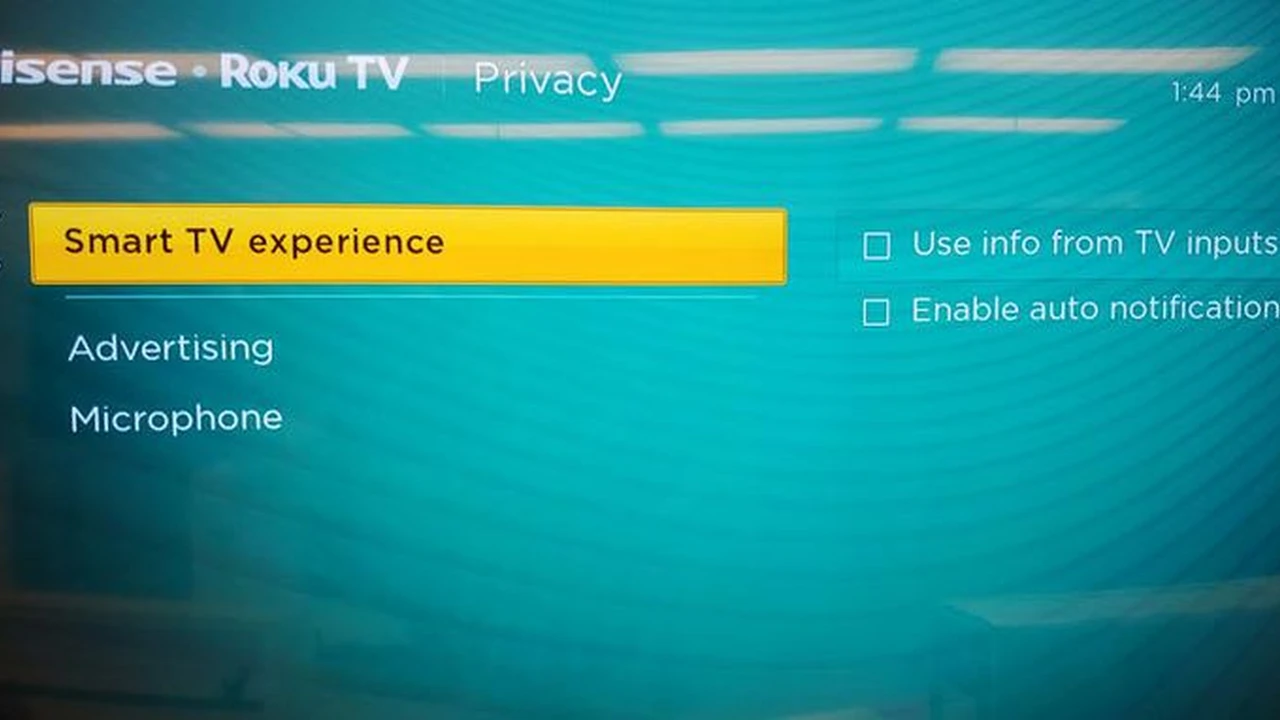
Smart devices often collect a lot of data about your habits, usage, and environment. Take the time to go through the privacy settings of each device and its accompanying app. Limit data collection to only what’s necessary for the device to function. Understand what data is being collected, how it’s being used, and with whom it might be shared. For example, your smart speaker might be recording snippets of conversations, or your smart TV might be tracking your viewing habits. Be proactive in managing these settings.
Use Strong Unique Passwords for All Accounts Password Management
Every smart device usually comes with an associated account (e.g., for the manufacturer’s app). Ensure you’re using strong, unique passwords for each of these accounts. Reusing passwords is a huge security risk. If one account is compromised, all other accounts using the same password become vulnerable. Consider using a reputable password manager to generate and store these complex passwords securely. This makes it easy to have unique, strong passwords for everything without having to remember them all.
Enable Two-Factor Authentication MFA for Smart Home Accounts
Wherever possible, enable two-factor authentication (2FA) or multi-factor authentication (MFA) for your smart device accounts. This adds an extra layer of security by requiring a second form of verification (like a code sent to your phone) in addition to your password. Even if a cybercriminal manages to get your password, they won’t be able to access your account without that second factor.
Disable Unused Features and Ports Minimizing Attack Surface
Many smart devices come with features or ports that you might never use. For example, some smart cameras might have an open port for remote access that you don’t need. If a feature isn’t essential for the device’s operation, disable it. Every active feature or open port is a potential vulnerability that an attacker could exploit. Minimizing your attack surface makes your network harder to penetrate.
Advanced Smart Home Network Security Strategies
For those who want to go the extra mile, here are some more advanced strategies to bolster your smart home’s defenses.
Network Segmentation VLANs for IoT Devices
This is a more advanced technique but incredibly effective. Network segmentation involves dividing your home network into separate, isolated segments (Virtual Local Area Networks or VLANs). You can create a dedicated VLAN for all your IoT devices, completely separating them from your main network where your computers and sensitive data reside. This way, even if an IoT device is compromised, the attacker is contained within that segment and cannot easily jump to your other devices. This usually requires a more advanced router or network switch that supports VLANs.
Implement a Firewall for Your Smart Home Network Perimeter Defense
While your router has a built-in firewall, you might consider a dedicated hardware firewall or a more robust router with advanced firewall capabilities. A firewall monitors incoming and outgoing network traffic and blocks anything suspicious. This adds an additional layer of protection against external threats trying to access your smart home network. Some advanced routers offer intrusion detection and prevention systems (IDS/IPS) which can actively identify and block malicious traffic.
Use a VPN on Your Router or Specific Devices Encrypted Traffic
A Virtual Private Network (VPN) encrypts your internet traffic, making it unreadable to anyone trying to snoop. While you can install VPN software on individual devices, installing a VPN directly on your router can protect every device connected to it, including your smart home gadgets. This ensures that all your smart home traffic is encrypted, adding a significant layer of privacy and security. Not all routers support VPN client functionality, so check your router’s specifications. If your router doesn’t support it, some smart devices or hubs might allow for individual VPN configuration.
Regularly Monitor Network Activity Anomaly Detection
Keep an eye on your network activity. Many routers provide logs of connected devices and traffic. Look for any unusual activity, such as unknown devices connecting to your network or unexpected data usage from a particular smart device. There are also network monitoring tools and apps that can help you visualize and analyze your network traffic, alerting you to potential anomalies. Early detection is key to preventing major security breaches.
Consider a Dedicated IoT Security Hub Centralized Protection
Some companies offer dedicated IoT security hubs or gateways that are specifically designed to monitor and protect smart devices. These hubs can often detect vulnerabilities, block malicious traffic, and provide centralized management for your smart home security. They act as an additional layer of defense between your smart devices and your main network. For example, products like CUJO AI Smart Firewall or Bitdefender Box are designed to provide this kind of centralized protection for all connected devices.
Recommended Products and Solutions for Smart Home Security
Let’s talk about some specific products that can help you secure your smart home network. These aren’t just theoretical solutions; these are tools you can actually use.
Advanced Routers for Network Segmentation and Security Features
- Ubiquiti UniFi Dream Machine (UDM) / UniFi Dream Router (UDR)
- Description: These are powerful all-in-one network appliances that combine a router, switch, and Wi-Fi access point. They offer advanced features like VLAN support for network segmentation, robust firewall capabilities, and deep packet inspection. They are highly configurable and provide excellent control over your network.
- Use Case: Ideal for users who want granular control over their network, including creating separate VLANs for IoT devices, guests, and sensitive data. Excellent for those comfortable with a slightly more technical setup.
- Pros: Enterprise-grade features, strong security, excellent performance, centralized management.
- Cons: Can be more complex to set up than consumer-grade routers, higher price point.
- Estimated Price: UDR around $199, UDM around $299-$379.
- ASUS ROG Rapture GT-AXE16000 / RT-AX88U Pro
- Description: ASUS offers high-performance routers with robust security features, often including AiProtection Pro (powered by Trend Micro). This suite provides network security, parental controls, and a built-in firewall. Many ASUS routers also support VPN client and server functionality, making it easy to encrypt all network traffic.
- Use Case: Great for users who want strong security features out-of-the-box, including intrusion prevention and malicious site blocking, without needing a highly technical setup. Good for gaming and high-bandwidth households.
- Pros: Excellent performance, strong built-in security (AiProtection Pro), user-friendly interface, good VPN support.
- Cons: Can be expensive, some advanced features might still require a bit of technical know-how.
- Estimated Price: GT-AXE16000 around $699, RT-AX88U Pro around $329.
Dedicated IoT Security Devices Centralized Threat Protection
- Bitdefender Box 2
- Description: This is a hardware device that acts as a security hub for your entire smart home network. It protects all connected devices, including those that can’t run traditional antivirus software. It offers intrusion prevention, vulnerability assessment, and parental controls. It monitors network traffic for suspicious activity and blocks threats before they reach your devices.
- Use Case: Perfect for users who want a ‘set it and forget it’ solution for comprehensive IoT security without needing to configure individual devices.
- Pros: Easy to set up, protects all devices, strong threat detection, includes Bitdefender Total Security for other devices.
- Cons: Requires an annual subscription after the first year, can sometimes interfere with specific network configurations.
- Estimated Price: Around $199 (includes 1 year subscription), then $99/year.
- CUJO AI Smart Firewall
- Description: Similar to Bitdefender Box, CUJO AI is a smart firewall that uses artificial intelligence to detect and block cyber threats at the network level. It provides real-time protection against malware, phishing, and other attacks for all your connected devices. It also offers parental controls and network activity monitoring.
- Use Case: For users looking for an intelligent, AI-driven security solution that protects all devices on the network, especially those without built-in security.
- Pros: AI-powered threat detection, easy installation, comprehensive protection, good parental controls.
- Cons: Requires a subscription, some users report occasional false positives.
- Estimated Price: Around $249 (includes 1 year subscription), then $89/year.
VPN Services for Router Installation Encrypting All Traffic
- ExpressVPN
- Description: One of the leading VPN providers known for its speed, reliability, and strong security features. ExpressVPN offers dedicated router firmware for many popular router models, making it relatively easy to install and protect all devices on your network.
- Use Case: Ideal for users who want to encrypt all their smart home traffic, bypass geo-restrictions, and enhance overall privacy for every connected device.
- Pros: Excellent speeds, strong encryption, vast server network, dedicated router app/firmware, no-logs policy.
- Cons: Higher price point compared to some competitors.
- Estimated Price: Around $6.67/month (annual plan).
- NordVPN
- Description: Another top-tier VPN service with a strong focus on security and privacy. NordVPN provides detailed guides for setting up their VPN on various routers, and some routers even have native NordVPN integration. It offers features like Threat Protection (ad/malware blocker) and Double VPN for extra security.
- Use Case: Great for users prioritizing strong security and privacy for their entire smart home, with a good balance of features and affordability.
- Pros: Strong encryption, large server network, additional security features, good value, clear router setup guides.
- Cons: Some users report occasional speed drops on certain servers.
- Estimated Price: Around $3.99/month (2-year plan).
Maintaining Your Smart Home Security Ongoing Vigilance
Securing your smart home isn’t a one-time task; it’s an ongoing process. Cyber threats evolve, and so should your defenses. Regular maintenance is key to staying protected.
Regular Security Audits Checking for Vulnerabilities
Periodically review your smart home setup. Check your router settings, device passwords, and privacy configurations. Are there any devices you no longer use that are still connected to your network? Disconnect them. Are there any new devices that need their passwords changed or firmware updated? Treat your smart home like a living, breathing entity that needs regular check-ups.
Stay Informed About New Threats and Vulnerabilities Cybersecurity News
The cybersecurity landscape is constantly changing. Stay informed about new threats, vulnerabilities, and security best practices. Follow reputable cybersecurity news sources, subscribe to security blogs, or even set up Google Alerts for your specific smart devices. Knowing about a vulnerability before it’s exploited gives you a crucial head start in protecting your home.
Backup Important Data Data Recovery and Protection
While securing your network is paramount, sometimes things can still go wrong. If you have smart devices that store important data (like security camera footage or smart home automation configurations), make sure you have a backup strategy in place. This could be cloud backups or local storage. In the event of a breach or device failure, having backups ensures you don’t lose valuable information.
Educate Your Household Members Security Awareness
Your smart home security is only as strong as its weakest link, and sometimes that link can be a human one. Educate everyone in your household about smart home security best practices. Teach them about strong passwords, the dangers of clicking suspicious links, and the importance of not sharing network passwords. A little awareness goes a long way in preventing accidental security lapses.
The Future of Smart Home Security Emerging Trends
The world of smart homes and cybersecurity is always evolving. What can we expect in the future?
AI and Machine Learning in Smart Home Security Predictive Defense
Artificial intelligence and machine learning are already playing a role in smart home security (as seen with products like CUJO AI). Expect to see more advanced AI-driven systems that can learn your network’s normal behavior, detect anomalies with greater accuracy, and even predict potential threats before they occur. This proactive approach will make smart homes even more resilient against attacks.
Standardized Security Protocols for IoT Interoperability and Safety
Currently, there’s a lack of universal security standards across different IoT device manufacturers. This fragmentation creates vulnerabilities. We’re likely to see a push towards more standardized security protocols and certifications for IoT devices, making it easier for consumers to identify truly secure products and ensuring better interoperability without compromising safety. Initiatives like Matter are a step in this direction.
Increased Focus on Privacy by Design Data Minimization
As consumers become more aware of data privacy, manufacturers will be pressured to adopt ‘Privacy by Design’ principles. This means building privacy into devices from the ground up, rather than as an afterthought. Expect devices that collect less data, offer more transparent privacy controls, and provide better anonymization options. This shift will empower users to have greater control over their personal information.
Decentralized Security Solutions Blockchain for IoT
Blockchain technology, known for its decentralized and immutable ledger, could play a role in future IoT security. Imagine a system where device identities and communications are secured and verified on a blockchain, making them incredibly difficult to tamper with. This could lead to more robust authentication and data integrity for smart home devices, reducing reliance on centralized servers that can be single points of failure.
Securing your smart home network might seem like a lot of work, but it’s an investment in your peace of mind and digital safety. By following these steps and staying vigilant, you can enjoy all the conveniences of your smart home without constantly worrying about cyber threats. Keep those updates coming, use strong passwords, and always be a little bit skeptical. Your digital fortress will thank you for it!